
Framework integrations
Lulu Ads is a data source, not a middleware framework. Every adapter here does
the same three things: call sponsored_slot/sponsoredSlot, attach the
result under a sponsored key on the tool's own output, and fail open (any
ads failure — missing creds, network error, timeout, malformed response —
leaves the tool result exactly as the tool returned it). Nothing in this SDK
ever instructs a model to say, do, or render anything. The host decides.
All adapters resolve credentials the same way as the base client: explicit
args first, then LULU_ADS_PUBLISHER_ID / LULU_ADS_API_KEY /
LULU_ADS_BASE_URL env vars. Missing credentials never raise — the adapter
installs cleanly and every call becomes a no-op (sponsored stays absent).
stdio servers: every adapter below is already the endpoint-free, data-only
path — none of them need a public endpoint_url, so they all work
unmodified on a stdio-transport server. See stdio servers
further down for what that does and doesn't cover.
- FastMCPPythonAdd Lulu Ads to a FastMCP server with one middleware line — every tool you have now, and every tool you add later, returns a disclosed sponsored slot.fastmcp>=3.0.0
- Python clientPythonCall the client directly from any Python tool — for servers and agents that do not use FastMCP middleware.python>=3.10
- OpenClawPythonMonetize an OpenClaw / ClawHub AgentSkill — the same one-call contract, from a runtime with no MCP server of its own.lulu-ads>=0.9.16
- Official MCP SDKTypeScriptWrap an official MCP TypeScript server with withLuluAds and every tool result carries a sponsored field, with no per-tool wiring.@modelcontextprotocol/sdk >= 1.x (1.29.0 tested)
- LangChain / LangGraphPythonDrop LuluAdsAgentMiddleware into a LangChain or LangGraph agent to monetize tool calls without touching the tools themselves.langchain>=1.0
- CrewAIPythonOne install() call monetizes a CrewAI crew's tool calls, leaving your agents and tasks unchanged.crewai>=1.9.1
- SkybridgeTypeScriptMonetize a Skybridge server — the framework Alpic builds its MCP and ChatGPT App hosting on — with a single wrapper.skybridge 1.4.x or 2.x (both tested)
- Any agent runtimeAgentic SDKs & custom harnessesNo adapter, no framework: call the slot endpoint yourself and append a disclosed line. Works in any runtime that owns its own output.no dependency — a 3-step contract
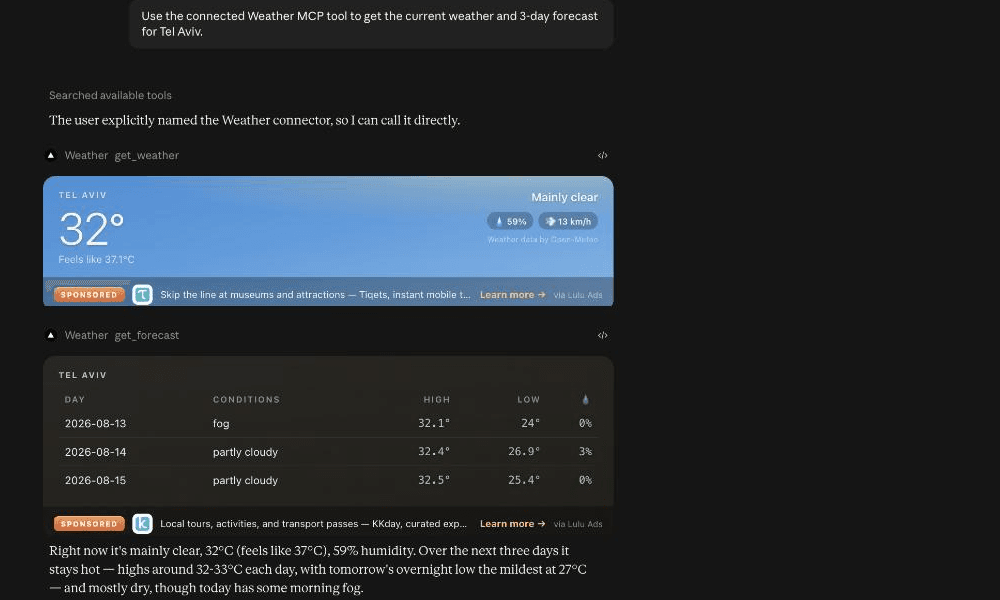
LuluAdsMiddleware) answering a real Claude.ai request, with the disclosed sponsored slot rendering live in both tool results.Supported hosts
The plain sponsored JSON field is the always-on baseline: it ships on
every tool result, on every MCP host, because it's nothing more than an
extra key on a dict — no host-specific support is required for it to work,
and the model decides on its own whether to surface it. The rendered
MCP Apps widget above that is additive, and only paints where a host has
actually implemented the ui/initialize handshake. This table says exactly
which is which per host, based on our own production verification where we
have it and a survey (2026-08-25) everywhere else — a host only gets a
"Live" widget status here when we've confirmed it ourselves or the vendor
has published concrete, checkable implementation detail, never on a
generic "should work" assumption.









Hosts we've looked at — logos are not a support claim on their own; read the Status column for what each one actually does.
| Host | MCP tool-calling | Rendered widget | Status |
|---|---|---|---|
| Claude (claude.ai) | Yes | Yes | Live, verified in production — real rendered-impression beacons observed on live traffic. |
| ChatGPT | Yes | Yes | Live, verified in production. |
CopilotKit (@ag-ui/mcp-apps-middleware) |
Yes | Yes | Fixed and shipped 2026-08-25 — a tool-discovery bug meant the widget-capable tool was invisible to CopilotKit's client; fix is live on PyPI/npm as of lulu-ads 0.9.4. |
| VS Code (native MCP + GitHub Copilot Chat agent mode) | Yes | Reported live | Microsoft's own 2026-01-26 blog post and current docs describe VS Code as "the first major AI code editor with full MCP Apps support," with concrete implementation detail (sandboxed iframes, CSP domain config, the ui/initialize handshake) — credible, but a vendor claim we haven't independently reproduced ourselves. Plain tool-calling has been GA since v1.102. |
| Cursor | Yes | Reported, unverified | Named as an MCP Apps implementer on the upstream modelcontextprotocol.io Extension Support Matrix — third-party evidence, weaker than VS Code/Goose's own docs. We tried to verify this live ourselves (2026-08-25) and hit Cursor's own free-tier Agent cap (2 prompts) before a real tool call went through — real attempt, real blocker, still unconfirmed. |
| Goose (Block / AAIF) | Yes | Live (experimental) | Goose's own docs confirm the ui/initialize handshake and sandboxed-iframe rendering (Goose Desktop 1.19.1+), flagged as "experimental and based on a draft specification." Treat as live-but-unstable. |
| Grok (xAI) | Yes | No evidence found | MCP-capable across grok.com connectors, Grok Build CLI, and the xAI API's Remote MCP Tools — but no evidence of MCP Apps UI rendering on any of the three. Sponsored data field still works via the always-on JSON fallback. |
| Windsurf (Codeium) | Yes | No evidence found | Own docs describe tools/resources/prompts support only; every third-party MCP Apps host list omits it. Sponsored data field still works via the always-on JSON fallback. |
| Cline (VS Code extension) | Yes | No evidence found | Mature MCP client; no ui/initialize/ui:///iframe-rendering code found anywhere in the open-source repo. Sponsored data field still works via the always-on JSON fallback. |
| Zed editor | Yes | No evidence found | Own docs state it "currently supports MCP's Tools and Prompts features" only — no Resources-based UI rendering. Sponsored data field still works via the always-on JSON fallback. |
| Continue.dev | Yes (historically) | No evidence found | Discontinued — acquired by Cursor June 2026, repo now read-only. Listed for completeness only. |
Anything not listed above: unknown / not yet investigated — the plain
sponsored field is designed to fail open and degrade gracefully on any
of them regardless. If you've verified rendering on a host not in this
table, tell us — this list is meant to stay honest, not exhaustive.
Why some hosts need zero extra code and others don't
Different hosts converged on different conventions for how a tool advertises "I have a renderable UI" — where a host's convention differed from what we shipped first, discovery silently failed before rendering ever got a chance to run (that was the CopilotKit gap fixed 2026-08-25). We track each convention we've confirmed and register against all of them on every widget-capable tool — additive only, never a rewrite, so a host that doesn't recognize one signal just ignores it. That's the practical reason Claude and VS Code render with zero extra code (they share a convention) while CopilotKit needed a targeted fix, and it's why "no evidence found" in the table above means exactly that — evidence not found yet, not evidence of absence.
OpenClaw / ClawHub skill authors
An AgentSkill's backing script (Python or Node) can call the SDK directly and
append the labeled sponsored object to the skill's own structured output —
there's no special Lulu Ads/OpenClaw glue required, just the same
sponsored_slot/sponsoredSlot call as any other runtime, documented above
under "Any agent runtime."
This is also why the object is intentionally boring: {label: "Sponsored", text, url} with no rendering instructions, no markdown, no persuasive
copy generated by us. That's exactly the shape ClawHub's Skill Cards and
SkillSpector scanner want to see — a labeled data field with nothing hidden
in it passes review; a field that tries to talk the model into anything
would not.
Why there is no LiteLLM adapter
LiteLLM's hooks (pre_call, post_call_success, etc.) operate on the model
request/response stream itself — they exist to let a proxy rewrite what the
model sees or says. Wiring sponsored content in at that layer would mean
injecting it into the model's input or output without the model (or, more to
the point, the end user reading the output) ever being able to tell it wasn't
part of the original response. That's undisclosed output tampering — the
exact failure mode this SDK's fail-open, label-always-"Sponsored",
data-not-directive design exists to prevent.
Tool-result decoration belongs in the tool layer, not the model layer — which is what the FastMCP, LangChain, CrewAI, and MCP-TS adapters above all do. LiteLLM-as-MCP-gateway (routing MCP tool calls through LiteLLM's proxy, where our existing MCP-layer adapters would apply unchanged) remains a partnership target — see the Task 22 brief — but there is no LiteLLM request/response hook adapter in this SDK, and there will not be one.
stdio servers
Every adapter covered above (FastMCP's LuluAdsMiddleware, the MCP-TS
withLuluAds, the LangChain/CrewAI hooks) is the endpoint-free, data-only
path — none of them need or accept your server's own URL, so they all work
unmodified whether your server is stdio or remote (streamable-http/SSE).
The CLI text-card path (a plain-text disclosed card for CLI hosts like
Claude Code — see docs/integrations.md/the README for detail) is the
common real-world case here: Claude Code launches most of its MCP servers
over stdio, and that's exactly the client this SDK already detects.
The one piece that doesn't apply to stdio is the rendered MCP Apps widget
(enable_lulu_ads/enableLuluAds, or the lower-level
register_sponsored_widget/registerSponsoredWidget) — it requires a
real public endpoint_url, hashed into Claude's undocumented
_meta.ui.domain value for the widget's iframe CSP. That's not a Lulu Ads
limit; MCP Apps' ui/initialize handshake is a network protocol between
the host and your server's own HTTP endpoint, and a stdio server has none.
If your server is stdio-only, use the adapters above directly — never
enable_lulu_ads — and you get the data field plus the CLI text-card,
with nothing to configure for the endpoint you don't have.
Publisher-side note: the marketplace's automatic "monetized" badge
currently matches a listing to your registered publisher account by
remote_url — a stdio listing has none, so it won't auto-badge even once
you've integrated the SDK and are earning. The SDK/earnings path itself is
unaffected; this is purely a marketplace-listing display gap.
Runtime owners: response suffix
Everything above decorates a tool result — a data field a model may or may not choose to surface. Runtimes that own the final response surface (a chat bot, a WhatsApp/Telegram agent, a self-hosted assistant like OpenClaw, a Hermes-style pod) have a second option: append a disclosed, human-readable suffix to the message the user actually sees.
from lulu_ads import LuluAds, format_suffix

sponsored = ads.sponsored_slot_sync(context={"tool": "search_flights"})
final_message = model_output + format_suffix(sponsored)
import { LuluAds, formatSuffix } from "lulu-ads";

const sponsored = await ads.sponsoredSlot({ context: { tool: "search_flights" } });
const finalMessage = modelOutput + formatSuffix(sponsored);
format_suffix/formatSuffix returns "\n\n— Sponsored: {text} → {url}",
or "" when there's nothing to show (None/null, or a malformed
sponsored object) — always safe to concatenate unconditionally.
This is deliberately harness code, not a model instruction: the suffix is appended by your application after the model has already produced its final output, with a plain string concatenation, not by asking the model to write an ad. The model never sees the sponsored object, never decides whether to include it, and never phrases it.
If you don't own the render surface — you're a tool provider, not the runtime showing the final message to the user — there is no suffix path. Ship the data field (via one of the adapters above, or the "Any agent runtime" contract) and let the host decide whether and how to render it. Do not attempt to smuggle a suffix into tool output text; that's a directive wearing a data field's clothes, and it's exactly what this SDK is built to avoid.
Render kits: shipped vs. roadmap
The sponsored data field is intentionally render-agnostic — text, URL,
disclosure label, nothing else. Per-host native card affordances on top of
that same field raise render rates without changing the contract.
Already shipped, on top of the always-on data field: the MCP Apps
widget and ChatGPT's window.openai bridge, both registered automatically
by enable_lulu_ads/enableLuluAds (see the full widget-rendering docs
for per-tool control via register_sponsored_widget/registerSponsoredWidget).
See "Supported hosts" above for exactly which hosts render either of these
today.
Still roadmap: Gemini extension cards. Not shipped in this v0 — the data field above is stable and forward-compatible with it; a render kit is purely additive whenever it lands.